
QUBIC BLOG POST
How to Query Qubic Oracle Machines Using the Qubic.Net Toolkit
Written by

The Qubic Team
Published:
Listen to this blog post
Oracle Machines are live on Qubic mainnet. Anyone can now send a query to the network's native oracle infrastructure and receive verified real-world data back on-chain.
The Qubic.Net Toolkit makes this accessible through a point-and-click desktop interface. No code, no command line. This guide walks you through the entire process, from download to your first oracle response.
What Are Oracle Machines on Qubic?
Blockchains can only work with data that already exists on-chain. A smart contract has no way to check the current price of Bitcoin or the result of a football match on its own.
Oracle Machines fix this. They sit between Qubic Core Nodes and external data sources, fetching real-world information and delivering it back in a format the blockchain can trust. Qubic's 676 Computors then verify the response through quorum consensus before it becomes available on-chain.
Two oracle interfaces are available at launch: the Price Oracle, which pulls live cryptocurrency price data from multiple providers, and the Mock Oracle, which returns test data for validating the query flow. More interface types will follow as the ecosystem grows.
What You Need Before Starting
A Qubic seed. Your 55-character lowercase password that generates your identity on the network. If you already use the Qubic Wallet, you have one. Guard this seed carefully. Qubic will never ask you for it, and anyone who has it controls your funds.
A funded wallet. Each oracle query costs 10 QU, which gets permanently burned. Your wallet needs to hold at least 10 QU before you can submit a query.
The Qubic.Net Toolkit. Available for Windows, macOS, and Linux. Grab the latest release from the GitHub Releases page.
Step 1: Download and Launch the Toolkit
Head to the Releases page and download the zip for your operating system.
Windows: Extract the zip and double-click Qubic.Net.Toolkit.exe.
macOS: Download the zip matching your chip (Apple Silicon or Intel). macOS pre-built binaries only support server mode:
chmod +x Qubic.Net.Toolkit ./Qubic.Net.Toolkit --server |
Linux: Extract, make executable, and run. Desktop mode works on Ubuntu 24.04+, Debian 13+, Fedora 39+, and Arch. Older distributions fall back to server mode automatically.
Always verify the SHA-256 hash of your download against the .sha256 file published with each release.
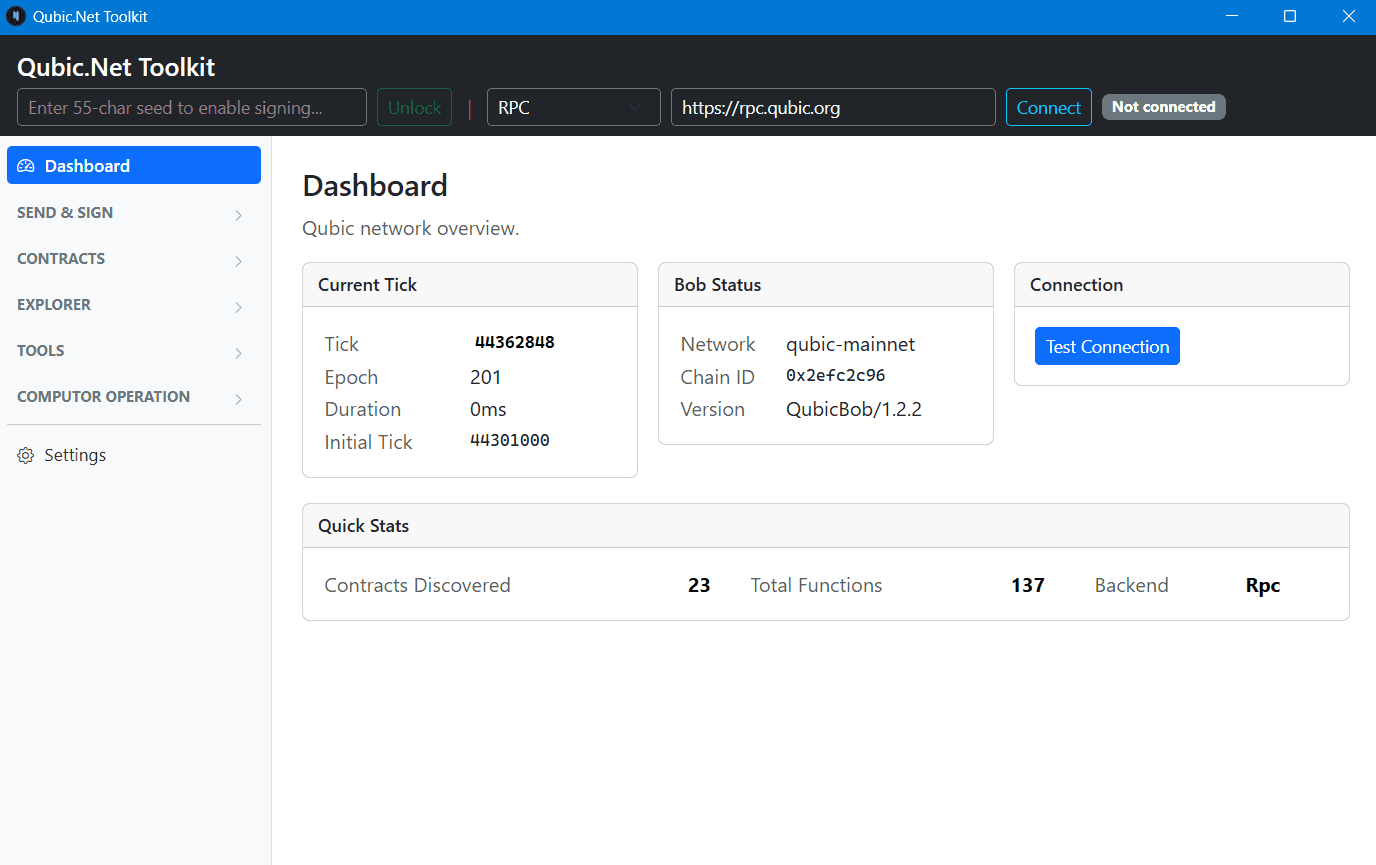
Once launched, you'll see the Dashboard showing the current tick, epoch, and network status.
Step 2: Enter Your Seed and Connect
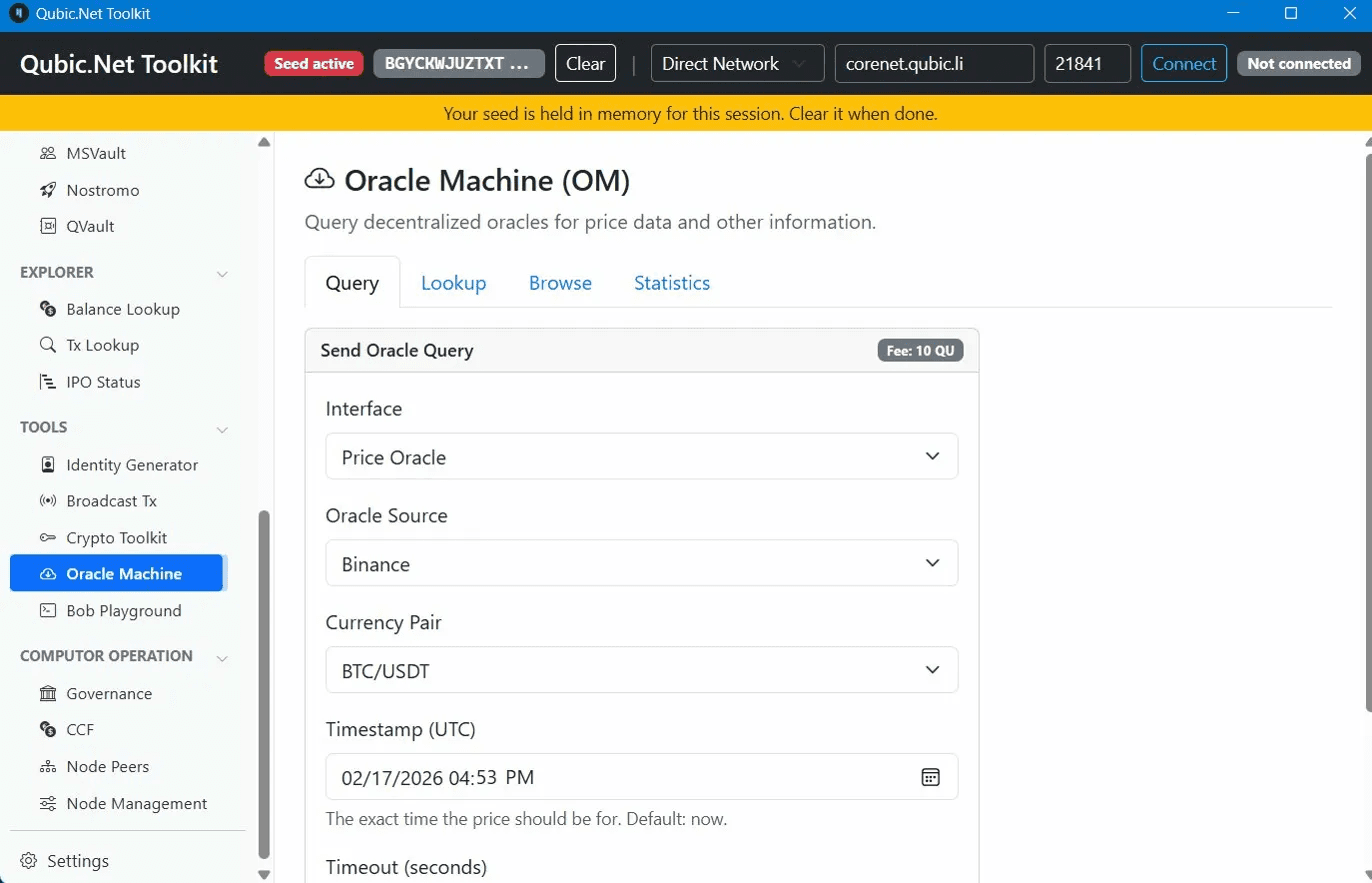
In the top bar, enter your 55-character Qubic seed. The toolbar will display "Seed active" with a truncated version of your address. A yellow banner confirms the seed is held in memory only for this session.
Before connecting, check the connection mode dropdown in the top bar. The toolkit defaults to RPC mode, but Oracle Machine queries require Direct Network mode. Switch the dropdown to Direct Network, then set the node address to corenet.qubic.li and the port to 21841. Now hit "Connect." The status badge in the top right should switch from "Not connected" to an active state.
Always click "Clear" when you're done to wipe the seed from memory.
Step 3: Navigate to Oracle Machine
Scroll down the left sidebar past Send & Sign, Contracts, DeFi, and Utility. Under the TOOLS section, click "Oracle Machine."
The main panel shows the Oracle Machine (OM) page with four tabs: Query, Lookup, Browse, and Statistics. Query is selected by default.
Step 4: Configure Your Oracle Query
The Query tab displays a form labeled "Send Oracle Query" with a fee badge reading "Fee: 10 QU." Here's what each field does:
Interface
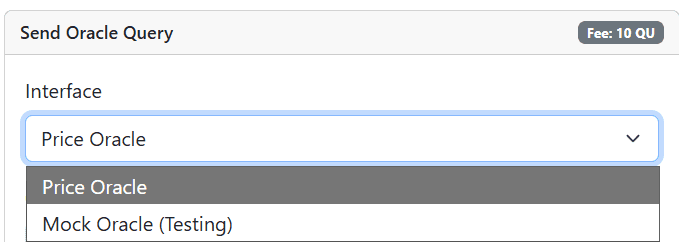
Choose the type of oracle you want to query:
Price Oracle — Fetches live cryptocurrency price data from external providers.
Mock Oracle (Testing) — Takes a numeric value (uint64), echoes it back, and returns double. Useful for verifying the query flow works end-to-end. Mock queries also cost 10 QU.
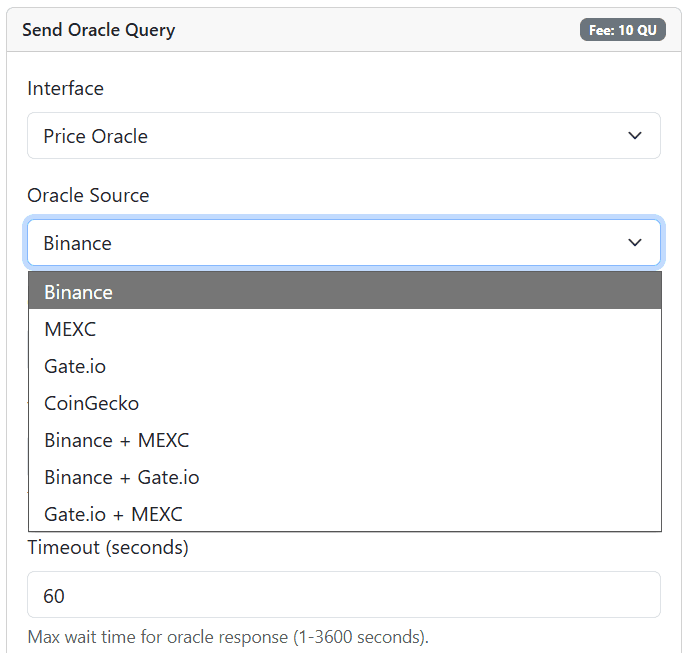
Oracle Source
The external data provider the oracle pulls pricing from include individual exchanges (Binance, MEXC, Gate.io) and combined sources (Binance + MEXC, Binance + Gate.io, Gate.io + MEXC).
Combined sources aggregate prices from both providers, reducing the risk of skewed data from a single exchange. Binance is a solid default for your first test.
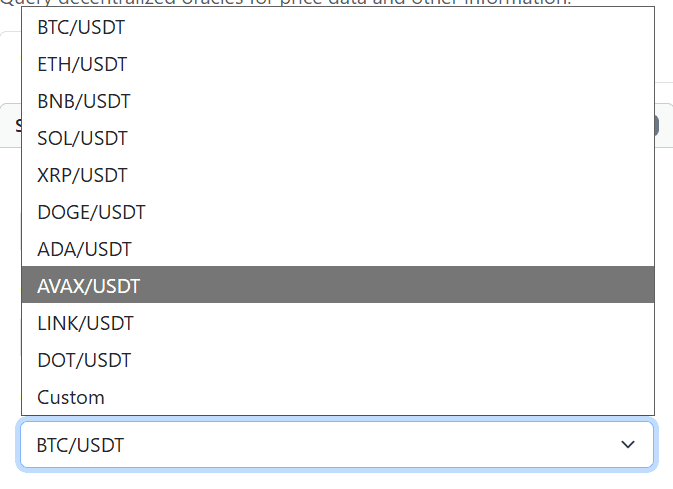
Currency Pair
The trading pair you want the price for. Major pairs quoted against USDT are available: BTC/USDT, ETH/USDT, BNB/USDT, SOL/USDT, XRP/USDT, DOGE/USDT, ADA/USDT, AVAX/USDT, LINK/USDT, DOT/USDT, and more.
Timestamp (UTC)
The exact time the price should correspond to. Defaults to now. Adjust it if you need price data from a specific moment.
Timeout (seconds)
How long to wait for a response before the request is marked as failed. Default is 60 seconds, with a range of 1 to 3600. Leave it at 60 for most queries.
Step 5: Send the Query and Check Results
Click the blue "Send Oracle Query (10 QU)" button. The 10 QU fee is deducted and burned permanently.
Your query enters the network's processing pipeline. The Oracle Machine receives the request, fetches the data from your selected provider, and returns it to the Qubic Core Nodes. Computors verify the response through quorum, and the verified result lands on-chain. Expected response time is around 10 seconds under normal conditions.
Track your query using the other tabs on the Oracle Machine page:
Lookup — Search for a specific query by its transaction details.
Browse — View recent oracle queries and responses across the network.
Statistics — Aggregate data about oracle usage and response times.
Your query status will read Pending (processing), Successful (delivered), or Failed (timed out).
Important Notes
Seed safety is non-negotiable. The toolkit never writes your seed to disk and never sends it over the network. Clear it after every session. Anyone asking for your seed is running a scam.
Server mode caveat. Running with the --server flag uses unencrypted HTTP on localhost. Other software on your machine could theoretically intercept this. Prefer desktop mode when possible.
This is beta software. The toolkit is under active development. Errors may occur.
All oracle fees are burned. The 10 QU per query doesn't go to any wallet or team. It's removed from circulation permanently.
What Can You Build With This?
Oracle queries unlock a new category of applications on Qubic. Prediction markets that settle automatically from verified real-world outcomes. DeFi protocols that trigger liquidations from reliable price feeds. Parametric insurance that pays out when measurable conditions are met.
The toolkit is ideal for testing queries during development. The same infrastructure is available programmatically through the Qubic.Net libraries for production use.
For technical details, see the Oracle Machine repository and the Qubic developer docs.
Oracle Machines are live. The data pipeline between the real world and Qubic smart contracts is open. Start querying.
Questions or feedback? Join the Qubic Discord community.