
QUBIC BLOG POST
How to Buy QUBIC With a Card: Qubic Is Live on Alchemy Pay in 173 Countries
Written by

The Qubic Team
Published:

Listen to this blog post
For most of its life, buying QUBIC meant taking the long way around. You bought another cryptocurrency first, moved it to an exchange that listed QUBIC, made the trade, then withdrew everything to a wallet. Four steps, three sets of fees, and a decent chance of losing the thread somewhere in the middle if it was your first time.
That path is now optional. Qubic has integrated with Alchemy Pay, a fiat-to-crypto payment gateway operating in 173 countries, which means you can buy QUBIC directly with a debit card, a credit card, or a local bank transfer. No exchange account. No bridging. No intermediate token.
Why buying QUBIC used to be difficult
Exchange listings expand where a token trades. Fiat on-ramp integrations expand who can buy it at all.
The gap between those two things is wider than it sounds. Someone in Jakarta or Lagos or São Paulo who has never opened an exchange account is not blocked by a lack of interest. They are blocked by KYC queues, deposit rails that do not reach their bank, and a purchase flow that quietly assumes they already hold crypto. Alchemy Pay removes that assumption by plugging into the payment methods people already use every day.
Where you can buy QUBIC, and how you can pay
QUBIC is now purchasable in 173 countries. The available payment methods depend on where you are, and Alchemy Pay detects your region automatically. Its supported payment methods include:
Global cards and wallets: Visa, Mastercard, JCB, Apple Pay, Google Pay
Latin America: PIX in Brazil, SPEI in Mexico
Asia: UPI in India, QRIS in Indonesia, VietQR in Vietnam, plus e-wallets and bank transfers across Malaysia and the Philippines
Europe: SEPA Instant
Africa: local bank transfers and mobile money in markets including Kenya and South Africa
Qubic's community was already spread across all those regions. What changes is that supporters can buy QUBIC using the same rails they use to pay rent.
Buying QUBIC in the United States
The US is usually where these announcements come with an asterisk. Not this time.
US-based buyers can purchase QUBIC directly with Visa or Mastercard debit and credit cards. Alchemy Pay has secured Money Transmitter Licenses in 18 states as of publication, with further approvals in progress, and covers the remaining ground through compliant channel partners. See the list of supported states here.
How to buy QUBIC with Alchemy Pay, step by step
The whole process takes a few minutes.
Before you start: set up a Qubic wallet
Alchemy Pay sends your QUBIC straight to a wallet you control, so you need the address before you begin.
If you do not have a Qubic wallet yet, this walkthrough covers the setup: How to create a Qubic wallet
You can use the official Qubic web wallet, or the official mobile wallet on iOS and Android. Two things to get right while you are in there:
Back up your seed offline. Anyone who has it has your funds, and nobody can recover it for you.
Copy your Qubic wallet address exactly. It is a 60-character uppercase string. Copy and paste it rather than retyping it.
Step 1: Open the Alchemy Pay ramp
Go to ramp.alchemypay.org.
Alchemy Pay reads your country from your IP address and shows the payment methods available there. If it guesses wrong, or you want to pay using an account you hold in another country, change the region manually at the top of the page.
Step 2: Select QUBIC and enter your amount
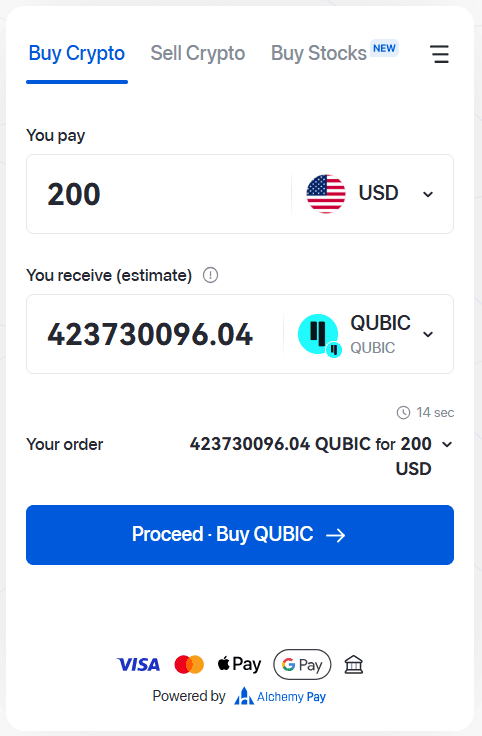
Choose your local fiat currency, then select QUBIC as the crypto you want to receive.
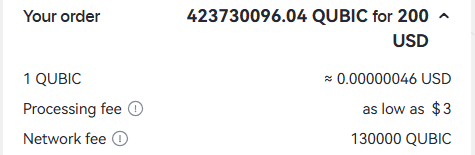
Enter the amount you want to spend. The widget calculates how much QUBIC that buys at the live rate and refreshes the quote every 15 seconds. Open the fee breakdown before continuing so you can see the payment processing fee and the network fee separately from the exchange rate.
Step 3: Paste your Qubic wallet address
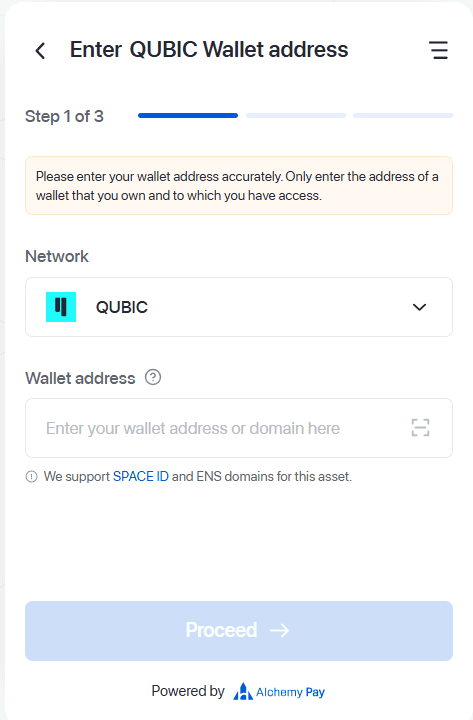
Click Proceed and paste your Qubic wallet address into the recipient field.
Check it, then check it again. Crypto transfers are irreversible, and an address typo means the QUBIC lands somewhere you cannot reach. This is the one step in the process with no undo button.
Step 4: Choose a payment method and pay
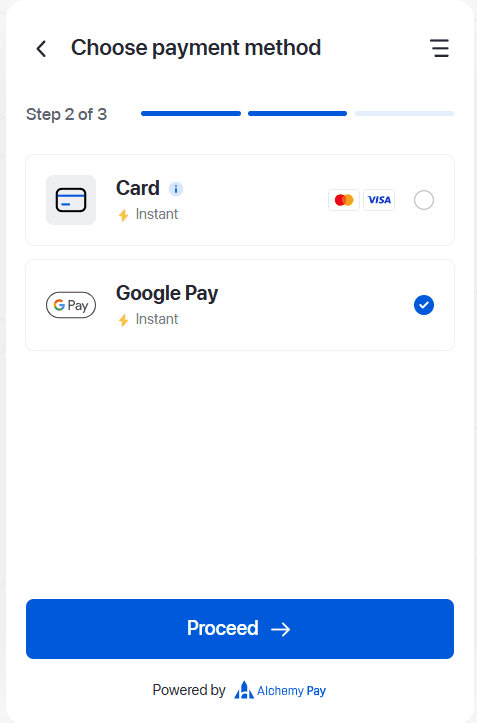
Click Proceed again to reach the payment page, then pick your method: card, bank transfer, or whichever local option is available in your region. Enter your payment details and confirm. Alchemy Pay's own on-ramp guide walks through the same screens if you want a second reference.
Step 5: Check your wallet
Once the payment settles, Alchemy Pay sends the QUBIC to the address you provided. Card payments usually arrive within minutes. Bank transfers depend on the rail and can take longer.
Open your wallet and confirm the balance. You can also verify the incoming transaction on the Qubic Explorer by searching your address.
If a payment fails or gets stuck, failed transactions are not charged. Contact Alchemy Pay support with your order ID and payment reference at support@alchemypay.org.
Frequently asked questions
Can I buy QUBIC without a crypto exchange? Yes. Through Alchemy Pay you can buy QUBIC directly with fiat and have it delivered to your own wallet, with no exchange account required.
Can I buy QUBIC with a credit card? Yes. Visa and Mastercard credit and debit cards are supported, along with Apple Pay, Google Pay, and local payment methods depending on your country.
Can US residents buy QUBIC? Yes. US buyers can purchase QUBIC with Visa or Mastercard cards through Alchemy Pay's regulated US channels.
Where does my QUBIC go after I buy it? Directly to the Qubic wallet address you enter during checkout. Alchemy Pay does not custody it for you, which is why setting up your wallet first matters.
Are there fees? Yes. Alchemy Pay charges a payment processing fee, and there is a network fee. Both are shown in the quote breakdown before you confirm.